ICMASS CH340G

- Part No.:
- CH340G
- Manufacturer:
- ICMASS
- Category:
- Controllers
- Package:
- 28-VFQFN Exposed Pad
- Description:
- IC USB-TO-UART BRIDGE 28VQFN
- Quantity:
-
Unit Price:$0
Ext Price:$0
- Payment:
-

- Shipping:
-


CH340G Information
- Specifications
- Product Details
- Comparison
- Tags
- Product attributes
- Attribute value
- Manufacturer:
- ICMASS
- Package/Case:
- 28-VFQFN Exposed Pad
- Programmable:
- Not Verified
- Protocol:
- USB
- Function:
- Bridge, USB to UART
- Interface:
- UART
- Standards:
- USB 2.0
- Voltage - Supply:
- 3V ~ 3.6V
- Current - Supply:
- 20mA
- Operating Temperature:
- -40°C ~ 85°C
- Supplier Device Package:
- 28-QFN (5x5)
- Grade:
- -
- Qualification:
- -
CH340G - USB to UART Bridge Controller, SOP-16, by WCH
The CH340G is a USB-to-serial bridge chip from WCH (Nanjing Qinheng Microelectronics). It takes USB 2.0 Full-Speed on one side and gives you TTL-level UART on the other: TX, RX, and all six hardware flow control signals if you need them. Baud rates from 50 bps to 2 Mbps. Runs on 5V or 3.3V. Costs about the same as a cup of bad coffee. This is the chip on the bottom of every Arduino Nano clone, every ESP8266 programming board, and half the USB-TTL adapters on the market.
But the CH340G is the old version. It needs an external 12 MHz crystal and two load capacitors to generate its clock. The newer CH340C has the oscillator built in - same pinout, same driver, one less thing to go wrong. For new designs, use the CH340C. For repair, maintenance, or matching an existing BOM that already has the CH340G in it, you order the CH340G. The difference is just the crystal and two caps. The chip itself is otherwise identical.
The CH340G's real-world reputation is a mess, and it's not entirely the chip's fault. WCH designed a solid, cheap USB-UART bridge. Then third-party manufacturers put unlabeled, partially-functional clone chips on Arduino boards, and in 2023 Microsoft pushed a Windows driver update that broke the clones. Suddenly millions of Arduino Nanos stopped showing up as COM ports. The fix is to install the 2019 driver or use the FakeCH340DriverFixer tool. Or buy boards with genuine, labeled CH340 chips. From our experience, if the CH340G on your board has no laser markings, it's a clone. Budget another $2 for a genuine replacement or spend an afternoon fighting drivers. Your call.
What Is the CH340G and How Does It Work?
The CH340G sits between a USB host (your computer) and a microcontroller's UART. On the USB side, it handles all the low-level USB protocol: enumeration, endpoint management, and data transfer at 12 Mbps (Full-Speed USB 2.0). On the UART side, it presents standard TTL-level serial: TX and RX at a configurable baud rate, plus RTS, CTS, DTR, DSR, DCD, and RI if you need hardware flow control. The chip is full-duplex with internal FIFO buffers on both transmit and receive paths.
On power-up, the CH340G enumerates as a CDC-ACM device (virtual COM port). The host OS loads the appropriate driver - Windows uses WCH's CH341SER driver, Linux uses the in-kernel ch341 module, macOS needs a manually installed driver from WCH. Once enumerated, any software that talks to a serial port can talk to the CH340G. Arduino IDE, PlatformIO, PuTTY, Python's pyserial, whatever.
The critical design detail that sets the CH340G apart from newer variants: the clock. The CH340G needs a 12 MHz crystal connected between XI (pin 7) and XO (pin 8), with two load capacitors (typically 22 pF each) to ground. If the crystal is off-frequency, the baud rate generator is off-frequency. If the load capacitors are wrong, the oscillator won't start reliably. If you substitute a ceramic resonator for the crystal, good luck - the frequency tolerance isn't tight enough and you'll get framing errors at higher baud rates. This external clock requirement is the single largest source of CH340G field failures on custom PCBs. The CH340C fixes this by integrating the oscillator on-die. Same driver, same pinout (mostly), no crystal needed. For any new PCB, just use the CH340C. The CH340G is for existing designs that already have the crystal footprint on the board.
What Are the Specifications of CH340G?
| Parameter | Value | Notes |
|---|---|---|
| Manufacturer | WCH (Nanjing Qinheng Microelectronics) | Chinese fabless semiconductor company |
| Function | USB 2.0 Full-Speed to UART Bridge | CDC-ACM virtual COM port class |
| USB Speed | 12 Mbps (Full-Speed) | Compatible with USB 1.1 hosts |
| Baud Rate Range | 50 bps – 2 Mbps | Standard rates plus custom divisors |
| Data Format | 5/6/7/8 data bits, 1/2 stop bits | None, even, odd, mark, space parity |
| FIFO Buffers | Internal TX and RX FIFOs | Sizes not publicly specified by WCH |
| Supply Voltage (VCC) | 4.5V – 5.5V (5V mode) / 3.3V – 3.8V (3.3V mode) | Set by VCC pin voltage |
| Operating Current | 12–30 mA typ | During active USB communication |
| Sleep Current | ~150 μA @ 5V / ~50 μA @ 3.3V | USB suspend mode |
| V3 Pin (Internal Regulator) | 3.3V reference for USB PHY | Decouple with 10 nF to GND @ 5V; tie to VCC @ 3.3V |
| Clock Source | External 12 MHz crystal (required) | Plus two load capacitors, 22 pF typ each |
| Hardware Flow Control | RTS, CTS, DTR, DSR, DCD, RI | All six modem signals available |
| DTR Auto-Reset | DTR# pin → capacitor → MCU RESET | Standard Arduino auto-reset circuit |
| RS232 Mode | Via R232 pin (active high) | Enables RS232-level output; needs external level shifter |
| Driver Support | Windows (CH341SER), Linux (ch341 kernel), macOS (WCH driver) | Windows 10/11 includes inbox driver; 2019 driver more compatible |
| USB Suspend Recovery | ~15 ms typ | Slower than CP2102; can cause brief disconnects |
| Package | SOP-16 (narrow body, 150 mil) | Surface mount; hand-solderable |
| Operating Temperature | -40°C to +85°C | Industrial temperature range |
| ESD Rating | Standard CMOS I/O protection | No enhanced ESD; external TVS recommended for exposed USB |
| Status | Active production, not recommended for new designs | Use CH340C (built-in oscillator) for new projects |
Numbers That Actually Matter in a Design
- The 12 MHz crystal is not optional and the load caps are not "whatever you have in the bin." The CH340G derives all internal timing - USB bit clock, baud rate generator, everything - from that one external crystal. The datasheet specifies 12 MHz with two load capacitors to ground. Typical values are 22 pF each, but the exact value depends on the crystal's specified load capacitance and your PCB's stray capacitance. If your board works at 9600 baud but drops characters at 115200, your crystal circuit is marginal. This is the most common CH340G hardware failure on custom PCBs. We see it constantly: the board enumerates, the COM port appears, but data gets corrupted above 9600 bps. Check the crystal. Swap the load caps. If you're designing a new board, save yourself the headache and use the CH340C which has the oscillator inside the chip.
- The V3 pin capacitor value is weirdly specific: 10 nF (0.01 μF). Not 100 nF. In 5V mode, the V3 pin (pin 4) is the output of the internal 3.3V regulator that powers the USB PHY. The datasheet says to decouple it with a 4.7–20 nF capacitor to ground. The standard value is 10 nF. If you put a 100 nF cap there instead - which is what every engineer's muscle memory says to do with a regulator output - the regulator becomes unstable during USB enumeration current transients. The chip may fail to enumerate, or enumerate intermittently. This is documented across Arduino forum threads going back years. In 3.3V mode, you connect V3 directly to VCC (no capacitor). The distinction matters: 5V mode = V3 gets a 10 nF cap to GND. 3.3V mode = V3 tied to VCC. Get this wrong and your board won't show up as a COM port.
- The counterfeit CH340G situation is bad enough that there are automated tools to deal with it. Genuine WCH CH340G chips have laser-etched markings on the package. Counterfeit/clone chips are blank - no markings, just a black SOP-16 rectangle. The clone chips work with the 2019 and earlier Windows drivers. They break with the 2023 and later drivers because WCH added chip authentication to the driver. The symptom: Windows Device Manager shows "USB2.0-Ser!" with an exclamation mark instead of "USB-SERIAL CH340 (COMx)." The fix is the FakeCH340DriverFixer tool on GitHub, which installs the 2019 driver and blocks Windows Update from replacing it. Or replace the clone CH340G with a genuine one. From our experience, if you bought a $3 Arduino Nano and the CH340G chip is blank, that's why. The board works fine. The chip is a clone. Install the old driver and move on with your life.
- DTR-based auto-reset is simple but fragile. The standard Arduino auto-reset circuit: DTR# pin (pin 13) → 100 nF capacitor → ATmega328 RESET pin. When the host opens the serial port, DTR# pulses low, the capacitor couples the edge to RESET, the MCU resets, and the bootloader runs. This works 99% of the time. The 1% where it doesn't: the capacitor value is wrong for the specific board's RESET pin capacitance, or the host's serial port open/close behavior doesn't produce a clean DTR edge, or the board's power supply takes too long to stabilize and the bootloader times out before VCC is valid. If your Arduino clone resets on every serial monitor open/close but uploads fail intermittently, add a 10kΩ pullup from RESET to VCC and try a smaller DTR capacitor (47 nF instead of 100 nF). Confirmed in dozens of Arduino forum threads.
What Is CH340G Used For?
Arduino Clone Boards (Nano, Uno, Mega)
This is where most people encounter the CH340G. Genuine Arduino boards use an ATmega16U2 as the USB-to-serial bridge, which costs about $2 in volume. Clone manufacturers use the CH340G, which costs about $0.15. The end result is identical from the user's perspective: a COM port appears, you upload code, the serial monitor works. The CH340G is the reason an Arduino Nano clone costs $3 instead of $25. For learning, prototyping, and one-off projects, the CH340G version is perfectly adequate. The only practical difference is that the CH340G needs a driver installed on Windows (the 16U2 uses the built-in USB CDC driver), and macOS needs a separate WCH driver install.
USB-TTL Serial Adapter Cables and Modules
Those little USB-to-serial adapter boards with the 6-pin header: VCC, GND, TXD, RXD, DTR, CTS. The chip on most of them is a CH340G. They're the universal debug console for embedded systems. Plug USB into your laptop, connect TX/RX/GND to your board's UART header, open a terminal at 115200 8N1, and you're watching boot logs. At $1-2 per adapter, you can leave one permanently attached to every prototype on your bench.
ESP8266 and ESP32 Programming Boards
The NodeMCU, Wemos D1 Mini, and countless other ESP8266/ESP32 dev boards use the CH340G as the USB interface. The ESP8266 bootloader requires precise DTR/RTS timing to enter programming mode, and the CH340G's hardware flow control pins handle this reliably when the board is designed correctly. If your ESP board won't enter flash mode, the problem is usually the auto-programming circuit (two transistors or a button combination), not the CH340G itself.
Industrial Equipment Serial Console Ports
Factory equipment, PLCs, HVAC controllers, and embedded Linux systems that need a USB serial console for configuration and diagnostics. The CH340G's industrial temperature range (-40 to +85°C) and wide supply voltage tolerance make it suitable for non-critical industrial applications. For safety-critical or high-reliability industrial designs, use the CP2102 or FT232RL instead - the CH340G's external crystal and lack of EEPROM-based configuration are points of failure that a production line doesn't need.
Custom PCB Programming Interfaces
If you're designing a board with a microcontroller and you want users to be able to program it over USB without an external programmer, you put a CH340G on the board. The BOM cost is negligible, the PCB footprint is small (SOP-16 plus the crystal and two caps), and the driver situation is well-understood. For new designs, use the CH340C and eliminate the crystal BOM entirely. The cost difference between CH340G and CH340C is about $0.05, and eliminating the crystal, two caps, and the PCB area they occupy saves more than that.
CH340G vs CH340C vs CP2102 vs FT232RL - Which USB-UART Bridge for Your Design?
| Feature | CH340G | CH340C | CP2102 (SiLabs) | FT232RL (FTDI) |
|---|---|---|---|---|
| Manufacturer | WCH (China) | WCH (China) | Silicon Labs (USA) | FTDI (UK) |
| Max Baud Rate | 2 Mbps | 2 Mbps | 1–3 Mbps | 3 Mbps |
| External Crystal | Required (12 MHz) | Built-in | Built-in | Built-in |
| EEPROM (Custom VID/PID) | No | No | Yes | Yes |
| Windows Driver | CH341SER (inbox or manual) | CH341SER (same driver) | CP210x (inbox) | FTDI D2XX/VCP |
| macOS Driver | Manual install | Manual install | Native support | Native support |
| Linux Driver | ch341 (in-kernel) | ch341 (same) | cp210x (in-kernel) | ftdi_sio (in-kernel) |
| Counterfeit Risk | Medium (blank chips) | Low | Low | High (notorious) |
| Hand-Solder Friendly | Yes (SOP-16, 1.27mm pitch) | Yes (SOP-16) | Difficult (QFN-28) | Moderate (SSOP-28) |
| Package | SOP-16 | SOP-16 | QFN-28 (5×5mm) | SSOP-28 |
| Price Position | $ | $ | $$ | $$$ |
| Best For | Existing designs, repair | New budget designs | macOS users, reliability | Custom USB descriptors |
Pick CH340G when: You're repairing or maintaining an existing design that already has the CH340G footprint. The crystal and load caps are already on the PCB. Ordering CH340G ensures drop-in replacement without layout changes. For any new design, skip the CH340G and use the CH340C - same driver, same pinout (mostly), no crystal to fail.
Pick CH340C when: You're doing a new budget-conscious design. It costs about the same as the CH340G but eliminates the 12 MHz crystal and two capacitors from your BOM. Fewer parts, fewer failure points, smaller PCB, faster assembly. The CH340C is the correct choice for Arduino-compatible boards, ESP32 programming interfaces, USB-TTL adapters, and any general-purpose USB-UART application where cost is the primary driver.
Pick CP2102 when: You need broad OS compatibility with zero driver hassle. Silicon Labs maintains the drivers well, and both macOS and Linux have native support. The QFN-28 package is harder to hand-solder but saves PCB space in compact designs. For commercial products where you don't want to field "I can't get the COM port to show up" support calls, the CP2102 is worth the extra cost. The built-in 3.3V regulator output is convenient for bus-powered designs.
Pick FT232RL when: You need custom USB descriptors (VID/PID, serial number, product string) burned into EEPROM, or you need the absolute highest reliability for an industrial/medical product. Buy from authorized channels - the FT232RL counterfeit situation is severe, and fake parts have been known to be deliberately disabled by FTDI's driver. At the FT232RL's price point (roughly 10× the CH340G), the chip costs more than some entire Arduino clone boards. For most applications, it's overkill.
Frequently Asked Questions About CH340G
Q1: My CH340G board stopped showing up as a COM port after a Windows update. What happened?
A: Microsoft pushed a driver update (version 3.8.2023.2 or later) that breaks communication with counterfeit/unmarked CH340G clone chips. Check Device Manager: if the device appears as "USB2.0-Ser!" instead of "USB-SERIAL CH340 (COMx)," you have a clone chip. The fix: download the 2019 driver from WCH's website or use the FakeCH340DriverFixer tool from GitHub, which installs the old driver and blocks Windows from updating it. Alternatively, look at the physical chip on your board: genuine CH340G chips have laser-etched markings. Blank SOP-16 packages are clones. If you just bought the board and it has a blank chip, return it. Genuine CH340G chips work fine with the latest drivers. This is the single most common CH340G support issue since 2023, discussed across Arduino Forum, SimHub GitHub, and the WCH community.
Q2: Why does my custom PCB with CH340G not show up as a COM port at all?
A: Check these in order. (1) The 12 MHz crystal: is it actually 12 MHz? Are the load capacitors the correct value (~22 pF)? Wrong caps are the #1 cause of "no COM port" on custom CH340G boards. (2) The V3 pin: in 5V mode, you need a 10 nF (0.01 μF) capacitor from V3 to GND, not 100 nF. In 3.3V mode, V3 should be tied directly to VCC. (3) 100 nF decoupling cap on VCC. (4) USB D+ and D- routed as a differential pair with series resistors if the traces are long. (5) No common ground between CH340G and the target MCU. (6) You're using a charge-only USB cable. Use a data cable. (7) RX and TX aren't crossed: CH340G TXD → MCU RX, CH340G RXD → MCU TX. If you've checked all of these and it still doesn't enumerate, swap the crystal. Confirmed across dozens of Arduino Forum custom PCB threads.
Q3: What's the difference between CH340G and CH340C? Which should I use?
A: The CH340G needs an external 12 MHz crystal and two load capacitors. The CH340C has the oscillator built into the silicon - no crystal, no caps. Same driver, same electrical specs, same baud rates, same package (SOP-16). The pinout is mostly the same but check the datasheet: a few pins changed function. For any new design, use the CH340C. It's about $0.05 more expensive than the CH340G, but you eliminate the crystal, two capacitors, and the PCB area for those three components. The total BOM cost is lower with the CH340C. For existing designs that already have the CH340G footprint and crystal on the board, order the CH340G for drop-in replacement. The CH340C exists specifically because the external crystal was the most common failure point on the CH340G.
Q4: How do I fix the "avrdude: ser_open(): can't set com-state" error on my CH340G Arduino?
A: This is the same counterfeit chip + new driver issue as Q1. The clone CH340G partially enumerates (the COM port number gets assigned) but fails when avrdude tries to configure the port parameters (baud rate, parity, etc.). The chip's clone silicon doesn't implement the full command set. Solution: install the 2019 driver. Second possibility: another program has the COM port open. Close Arduino IDE's Serial Monitor, Cura, Pronterface, or any other software that might have grabbed the port. Third: on Windows, go to Device Manager → Ports → USB-SERIAL CH340 → Port Settings → Advanced, and uncheck "Use FIFO buffers." Some clone chips crash with FIFO enabled.
Q5: Can I use CH340G on macOS? What about Linux?
A: macOS: yes, but you need to install WCH's driver manually. Download it from WCH's website. Newer macOS versions (Sequoia and later) may require you to approve the kernel extension in System Preferences → Security & Privacy. The driver situation on macOS is not as smooth as CP2102 (which is natively supported), but it works once installed. Linux: the ch341 kernel module has been in the mainline kernel for years. Plug in the board, dmesg shows a new ttyUSB device, and it just works. No driver install needed. If you're shipping a product to macOS users, strongly consider the CP2102 instead to avoid support burden.
Q6: Why does my CH340G randomly disconnect and reconnect?
A: Three common causes. (1) USB suspend/resume timing: the CH340G takes about 15 ms to recover from USB suspend, which is slower than most other USB-UART chips. If the host puts the USB bus into selective suspend aggressively, the CH340G may not wake up in time and the OS sees a disconnect. Disable USB selective suspend in Windows power settings. (2) Marginal crystal oscillator: if the crystal is starting unreliably, the chip may lose its clock during USB bus reset events and fail to re-enumerate. Try different load capacitors. (3) Power supply noise: if the USB VBUS has significant ripple (common on cheap powered USB hubs), the CH340G's internal brown-out detector may trigger. Add a 10 μF electrolytic in parallel with the 100 nF ceramic on VCC. Confirmed on the Arduino Forum and WCH community.
Q7: Is the CH340G suitable for production/commercial products?
A: For low-cost consumer products: yes, with caveats. Use the CH340C instead - eliminating the crystal improves production yield measurably. Buy genuine WCH chips from traceable sources (blank unmarked chips are clones and will generate support calls). Test every board's USB enumeration as part of your production test procedure. Budget for supporting customers who can't get the driver installed, especially on macOS. For industrial, medical, or high-reliability products: use CP2102 or FT232RL instead. The CH340 family's driver situation and counterfeit risk make it unsuitable for applications where a non-functional COM port means a service call or a safety issue.
Pricing & Availability
| Parameter | Details |
|---|---|
| Part Number | CH340G |
| Manufacturer | WCH (Nanjing Qinheng Microelectronics) |
| Package | SOP-16 (narrow body, 150 mil, surface mount) |
| Condition | New, genuine WCH - laser-etched markings, full traceability |
| Lead Time | In stock, ship from Shenzhen |
| Packing | Tube or Tape & Reel |
Contact ICMASS for current pricing and volume quotes. We stock genuine WCH CH340G USB-UART bridge chips with full traceability. Also available: CH340C (recommended for new designs - built-in oscillator, no external crystal needed), CH340B (with EEPROM for custom USB descriptors), and CH340E (MSOP-10 for ultra-compact designs). For the companion 12 MHz crystal and 22 pF load capacitors, ask our team for a bundled BOM quote.
| Image |

|
| Part Number | CH340G |
| Manufacturer | ICMASS |
| Package/Case | 28-VFQFN Exposed Pad |
| Programmable | Not Verified |
| Protocol | USB |
| Function | Bridge, USB to UART |
| Interface | UART |
| Standards | USB 2.0 |
| Voltage - Supply | 3V ~ 3.6V |
| Current - Supply | 20mA |
| Operating Temperature | -40°C ~ 85°C |
| Supplier Device Package | 28-QFN (5x5) |
| Grade | - |
| Qualification | - |
User Guide
- Purchase & Inquiry
- Package
- Shipping Information
- Customer Review
You may place an order without registering to IC-MAX.COM
We strongly suggest you sign in before purchasing as you can track your order in real time.
For your convenience, we accept multiple payment methods in USD, including PayPal, Credit Card, and wire transfer.
RFQ (Request for Quotations)
It is recommended to request for quotations to get the latest prices and inventories about the part.
Our sales will reply to your request by email within 24 hours.
1. You'll receive an order information email in your inbox. (Please remember to check the spam folder if you didn't hear from us).
2. Since inventories and prices may fluctuate to some extent, the sales manager is going to reconfirm the order and let you know if there are any updates.
-
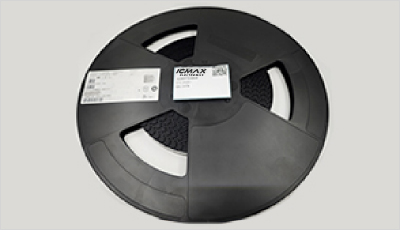
- Step1:Prepare product
-
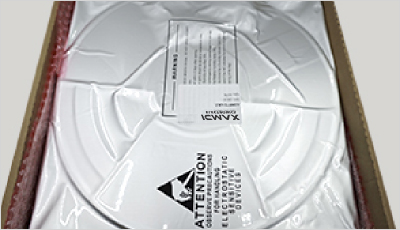
- Step2:Vacuum packaging
-
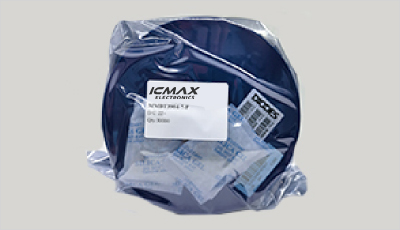
- Step3:Anti-static bag
-
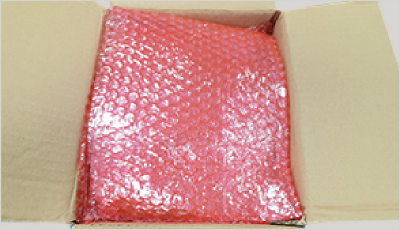
- Step4:Individual package
-
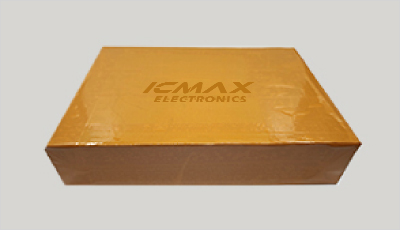
- Step5:Packaging box
-
- Step6:Barcode shipping label
Shipping starts at $40, but some countries will exceed $40. For example (South Africa, Brazil, India, Pakistan, Israel, etc.)
The basic freight (for package ≤0.5kg or corresponding volume) depends on the time zone and country.
Currently, our products are shipped through DHL, FedEx, SF, and UPS.
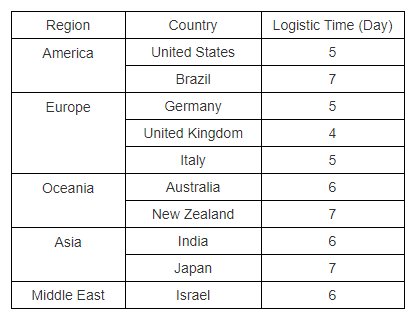
Delivery TimeOnce the goods are shipped, estimated delivery time depends on the shipping methods you chose:
FedEx International, 5-7 business days.
The following are some common countries' logistic time.
- Hot Sale
- Related Categories
- Include Parts
- Popular Search
The following parts include "CH340G" in Silicon Labs CH340G.
- Part Number
- Manufacturer
- Package
- Description
- PTN5150AHXMP NXP USA Inc. 28-VFQFN Exposed Pad IC USB-TO-UART BRIDGE 28VQFN
- USB3740B-AI9-TR Microchip Technology 28-VFQFN Exposed Pad IC USB-TO-UART BRIDGE 28VQFN
- USB3740B-AI2-TR Microchip Technology 28-VFQFN Exposed Pad IC USB-TO-UART BRIDGE 28VQFN
- USB3300-EZK-TR Microchip Technology 28-VFQFN Exposed Pad IC USB-TO-UART BRIDGE 28VQFN
- USB3300-EZK Microchip Technology 28-VFQFN Exposed Pad IC USB-TO-UART BRIDGE 28VQFN
- FUSB340TMX onsemi 28-VFQFN Exposed Pad IC USB-TO-UART BRIDGE 28VQFN
- FUSB302BMPX onsemi 28-VFQFN Exposed Pad IC USB-TO-UART BRIDGE 28VQFN
- DP83826IRHBR Texas Instruments 28-VFQFN Exposed Pad IC USB-TO-UART BRIDGE 28VQFN
- MCP2518FDT-E/QBB Microchip Technology 28-VFQFN Exposed Pad IC USB-TO-UART BRIDGE 28VQFN
- FUSB302MPX onsemi 28-VFQFN Exposed Pad IC USB-TO-UART BRIDGE 28VQFN
The following parts are popular search parts in Test and Measurement.
Inventory:16,170
Please send an inquiry. Send us your inquiry, and we will respond immediately.

- 1500+ Daily average RFQ Volume

- 20,000.000 Standard Product Unit

- 1800+ Worldwide Manufacturers

- 15,000+ In-stock Warehouse